Harness Engineering: What Actually Powers AI Agents
Over the past few days, I became increasingly curious about how modern AI applications actually work. Code generation, image generation, video generation, chatbots, AI agents—they all seemed far too capable to be powered by a single LLM acting as the source of truth. There had to be an engineering layer coordinating prompts, tools, validation, retries, safety checks, and workflows behind the scenes. That curiosity led me down the rabbit hole of learning about harness engineering, and I realized it's one of the most overlooked pieces of building reliable AI systems.
As of mid-2026, everyone is talking about AI agents. Anthropic launched new agents, OpenAI released new capabilities, DeepSeek shipped more powerful models, Every few weeks, another model arrives with more parameters, larger context windows, faster reasoning, or lower costs. It makes it seem like the model itself is the entire story.
But can a raw LLM actually manage an entire application on its own? Can it reliably download dependencies, organize a project, migrate databases, modify files, recover from failures, and generate production-ready code without making mistakes?
Not really.
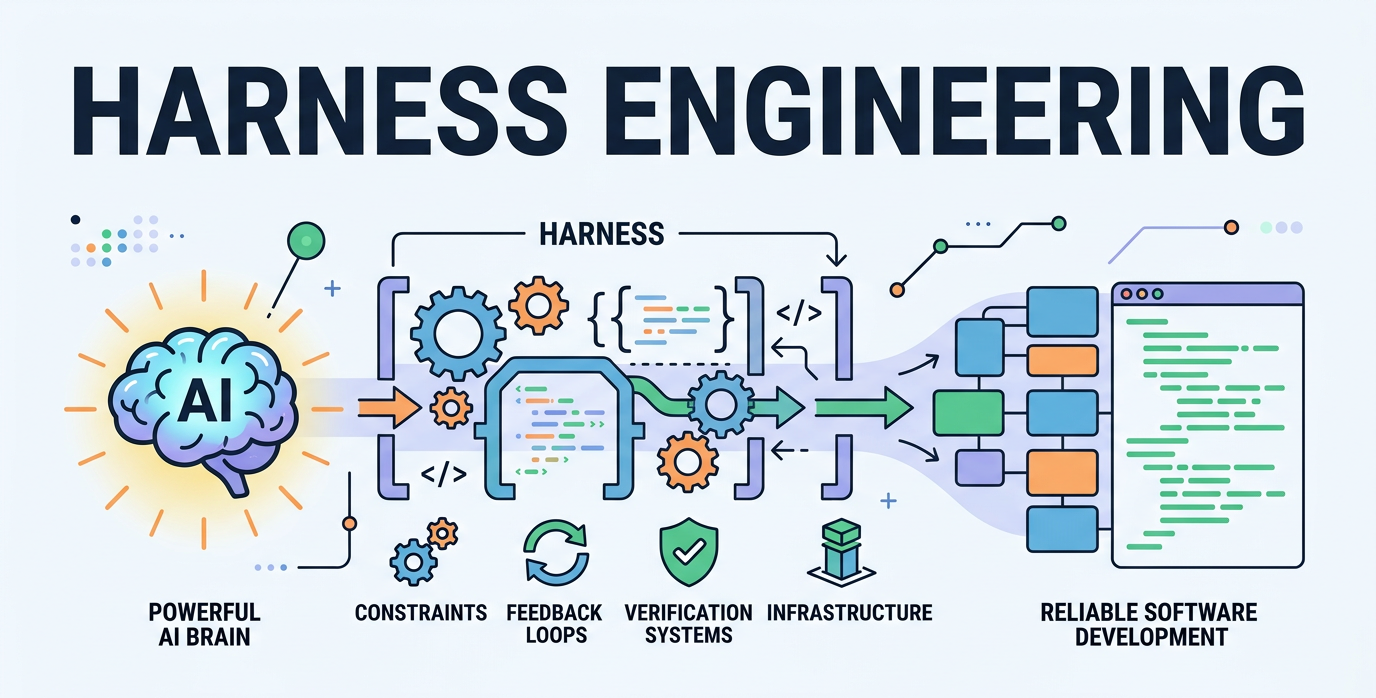
An LLM is just a raw model. Between your prompt and the final output, there are many engineering layers that make AI systems reliable: input validation, guardrails, schema enforcement, retries, moderation, observability, fallback logic, tool orchestration, and file management. These layers—not just the model itself—are what transform a chatbot into a dependable AI agent,it needs a HARNESS.
How does the system react when errors occur? Does it try to resolve them so they don't reappear at later stages? Setting up all of this logic is what ensures an agent functions properly. A raw LLM alone cannot do what an agent does.
Same Model, Different Results
A recent study by Anthropic illustrates this perfectly. Same prompt ("build a 2D retro game editor"), same model (Opus 4.5), two runs:
- First run (no harness): 20 minutes, $9, and the game's core features didn't work.
- Second run (full harness): a planner, generator, evaluator three-agent architecture. 6 hours, $200, and the game was fully playable.
They didn't change the model. Opus 4.5 was still Opus 4.5. What changed was the harness.
OpenAI's 2025 harness engineering article puts it even more bluntly: Codex in a well-harnessed repository goes from "unreliable" straight to "reliable." Note the wording. Not "a bit better," but a qualitative leap. Harness here means all the engineering infrastructure beyond the model weights.
A Simple Example
Without a harness
import { generateText } from "ai";
import { openai } from "@ai-sdk/openai";

async function run() {
  const userPrompt = "Write a short product description for a reusable water bottle.";

  const result = await generateText({
    model: openai("gpt-4o-mini"),
    prompt: userPrompt,
  });

  console.log(result.text);
}

run().catch(console.error);
With a harness (simple version)
import { generateText } from "ai";
import { openai } from "@ai-sdk/openai";

// User Input
const userPrompt = "Write a short product description for a reusable water bottle.";

// Harness Engineering (Simple)
// ✓ Prompt Template
// ✓ Basic Guardrail
// ✓ Input Validation
// ✓ Model Routing
// ✓ Logging
// ✓ Retry/Fallback

function validateInput(prompt: string) {
  if (!prompt || prompt.trim().length < 10) {
    throw new Error("Prompt must be at least 10 characters.");
  }
}

function guardrails(prompt: string) {
  const blocked = ["password", "api key", "social security"];
  const lower = prompt.toLowerCase();
  if (blocked.some((w) => lower.includes(w))) {
    throw new Error("Prompt blocked by safety guardrail.");
  }
}

async function callModelWithRetry(prompt: string) {
  const models = [openai("gpt-4o-mini"), openai("gpt-4.1-mini")];

  for (const model of models) {
    for (let attempt = 1; attempt <= 2; attempt++) {
      try {
        const startedAt = Date.now();

        const result = await generateText({
          model,
          system: "You are a concise marketing copywriter.",
          prompt: `Write clear product copy:\n${prompt}`, // prompt template
          temperature: 0.4,
          maxOutputTokens: 120,
        });

        console.log("LLM call success", {
          model: String(model),
          attempt,
          latencyMs: Date.now() - startedAt,
        });

        return result.text;
      } catch (err) {
        console.warn("LLM call failed", {
          model: String(model),
          attempt,
          error: err instanceof Error ? err.message : "Unknown error",
        });
      }
    }
  }

  throw new Error("All model attempts failed.");
}

async function run() {
  try {
    validateInput(userPrompt);
    guardrails(userPrompt);
    const text = await callModelWithRetry(userPrompt);
    console.log("\nFinal Output:\n", text);
  } catch (err) {
    console.error("Request failed:", err instanceof Error ? err.message : err);
  }
}

run();
So What Is Harness Engineering?
Harness engineering is the design of the control layer around an LLM: validation, guardrails, retries, schema enforcement, moderation, observability, and fallback logic.
- Prompt engineering = what you ask the model.
- Harness engineering = how your app safely and reliably runs the model call.
Think:
- Input checks
- Output format enforcement
- Safety filters
- Timeouts and retries
- Logging and tracing
- Cost controls
- Failover models
What the harness above adds (and why it matters)
- Input schema (Zod): prevents malformed requests from reaching the model.
- Preflight policy: blocks sensitive or unsafe requests before spending tokens.
- Structured output schema: forces model output into a reliable JSON shape (
generateObject+ Zod). - Retries with backoff: handles transient API and network failures.
- Fallback model chain: improves reliability if the primary model fails.
- Postflight policy checks: validates model output before returning it to users.
- Observability metadata: adds latency, model, and request IDs for debugging and analytics.
These are failure-diagnosis layers, not additional core concepts. Build this habit, and you'll find "the model isn't good enough" appearing less and less in your logs.
What a Harness Actually Is
The word "harness" gets thrown around a lot in AI coding agent circles, but most of the time, when people say "harness," they really just mean a prompt file. A prompt file is not a harness.
Here is a precise, actionable definition. Not an academic abstraction, but a framework you can put to work today. A harness consists of five subsystems:
- Instructions
- Tools
- Environment
- State
- Feedback
Each subsystem has clear responsibilities and evaluation criteria.
Start with an analogy
Imagine joining a project with no README, documentation, or clear instructions. Before writing code, you'd spend most of your time understanding the project. AI agents face the same challenge, except they can't ask teammates—they only know what exists in the repository. That's why harness engineering matters: the repository becomes the specification, providing structured context, clear instructions, verification steps, and workflows that allow the model to perform reliably.
Popular AI Tools Through the Harness Engineering Lens
Once I understood harness engineering, I started looking at popular AI coding tools differently. I realized they aren't just "LLMs with a UI"—they each implement their own harness around the model. The better the harness the better it should perform.
Claude Code
Claude Code is one of the clearest examples of harness engineering in practice. It reads project-specific instructions from CLAUDE.md, understands your repository structure, executes shell commands, edits files, runs tests, and uses the results as feedback for the next iteration. Rather than treating every prompt as an isolated conversation, it works within your project's environment. The better your repository is documented and the more explicit your verification commands are, the better Claude Code performs.
Cursor
Cursor follows a similar philosophy. It uses project rules (.cursorrules or project instructions), has access to your codebase, terminal, linting tools, and version control, allowing it to reason about an entire project instead of a single file. Its harness focuses on keeping the model grounded in your workspace and development workflow. However, compared to long-running agents, its state is more session-oriented—closing the IDE typically resets much of the working context.
OpenAI Codex
OpenAI's Codex is designed around the idea that the repository is the specification. It can operate inside isolated environments, use Git worktrees, execute verification commands, and rely on files like AGENTS.md to understand how a project should be built and tested. The model itself doesn't magically know your project's conventions—the harness supplies that knowledge through repository instructions, tooling, and automated verification.
GitHub Copilot
GitHub Copilot began primarily as an autocomplete assistant, but modern versions have evolved into agentic workflows. Instead of only suggesting code, Copilot can inspect repositories, modify multiple files, execute tasks, and interact with development tools. Its effectiveness depends heavily on the surrounding IDE integrations, repository context, and available tools—not just the underlying language model.
OpenCode
OpenCode operates directly on your local repository. It can inspect the project structure, read documentation such as README.md and AGENTS.md (when present), search the codebase, edit files, execute terminal commands, run tests, and use the results as feedback for subsequent steps. Rather than relying solely on the prompt, it reasons over the repository, development tools, and execution environment provided by the harness.
The Common Pattern
Although these tools differ in their implementations, they all share the same underlying idea. The language model provides reasoning, but the harness provides everything else: project instructions, tools, execution environments, memory, verification, retries, feedback, and safety. As models continue to improve, the quality of the harness increasingly determines how capable and reliable an AI agent becomes.
The AI industry spends enormous effort benchmarking models, but most production failures don't come from the model—they come from everything around it. Harness engineering is the discipline of designing those surrounding systems: the instructions, tools, environment, state, and feedback loops that allow a model to operate reliably. As models continue improving, the biggest competitive advantage may no longer be choosing the best model, but building the best harness around it.
I'm still at the beginning of my journey into harness engineering, and this blog reflects what I've learned so far through reading documentation, experimenting with AI tools, and building projects. As I continue studying the topic and gain more hands-on experience, I'll keep updating this article with new insights, examples, and best practices.
Thanks for taking the time to read—I hope you found it useful!